Gilang Firmansyah Widianto
Galuh Putri Widianto

1.3. Addressing

The addressing modes in the 80C51 instruction set are as follows:
An "addressing mode" refers to how you are addressing a given memory location. In summary, the addressing modes are as follows, with an example of each:

   Immediate Addressing  MOV A,#20h
Direct Addressing MOV A,30h
Indirect Addressing MOV A,@R0
External Direct MOVX A,@DPTR
Code Indirect MOVC A,@A+DPTR

Immediate Addressing

Immediate addressing is so-named because the value to be stored in memory immediately follows the operation code in memory. That is to say, the instruction itself dictates what value will be stored in memory.
For example, the instruction:


;Lesson 1.3.1
;===========================================
;
This instruction uses Immediate Addressing because the
;Accumulator will be loaded with the value that immediately
;follows in this case 20 (hexidecimal).
;===========================================

org 0h
start:MOV A,#20h; put constant 20 into Acc
end

;Lesson 1.3.2
o
rg 0h
Start:MOV A, #0h;
MOV A,#11h;
MOV B,#27h;
end
;
;Lesson 1.3.3
Org 0h
Start:MOV 70h,#0h; put constant 0 into RAM 70h
MOV 71h,#1h;
MOV 72h,#2h;
end
;
;Lesson 1.3.4
Org 0h
Start:MOV DPTR,#1234h;put constant 1234 into DPTR
end
;
;Lesson 1.3.5
Org 0h
Start:MOV PSW,#0; Select register bank 0
MOV R0,#0; put 0 into register 0
MOV R1,#1; put 1 into register 1
MOV R2,#2; put 2 into register 2
MOV R3,#3; put 3 into register 3
MOV R4,#4; put 4 into register 4
MOV R5,#5; put 5 into register 5
MOV R6,#6; put 6 into register 6
MOV R7,#7; put 7 into register 7
end
;
;Lesson 1.3.6
org 0h
Start:MOV PSW,#8; Select register bank 1
MOV R0,#0; put 0 into register 0
MOV R1,#1; put 1 into register 1
MOV R2,#2; put 2 into register 2
MOV R3,#3; put 3 into register 3
MOV R4,#4; put 4 into register 4
MOV R5,#5; put 5 into register 5
MOV R6,#6; put 6 into register 6
MOV R7,#7; put 7 into register 7
end

Immediate addressing is very fast since the value to be loaded is included in the instruction. However, since the value to be loaded is fixed at compile-time it is not very flexible.

Direct Addressing

Direct addressing is so-named because the value to be stored in memory is obtained by directly retrieving it from another memory location. For example:

;Lesson 1.3.7
;============================================
;This This instruction will read the data out of Internal
;RAM address 30 (hexidecimal) and store it in the
;Accumulator.
;============================================

;
org 0h
Start:MOV A,30h;
end
;
;Lesson 1.3.8
Org 0h
Start:Mov 70h,#1;put constant 1 into RAM 70h
Mov A, 70h;copy RAM 70 content into Acc
Mov A,#0 ;put constant 0 into Acc
Mov 90h,A ;copy Acc content into RAM 90h
end
;
;Lesson 1.3.9
Inbyte equ 70h
Port1 equ 90h
Org 0h
Start: Mov Inbyte,#3;put constant 3 into RAM 70h
Mov A,Inbyte ;copy RAM 70h content into Acc
Mov A,#0 ;Clear accumulator
Mov Port1,A ;copy Acc content into RAM 90h
end
;
Percobaan 2.5.3:
Org 0h
Mov DPTR,#Character
Start:Mov A, #0
Inc DPTR
Movc A, @A+DPTR
Mov R0,A
Sjmp Start
Character:
DB 0,1,2,3,4,5,6,7,8,9

Direct addressing is generally fast since, although the value to be loaded isn’t included in the instruction, it is quickly accessable since it is stored in the 8051’s Internal RAM. It is also much more flexible than Immediate Addressing since the value to be loaded is whatever is found at the given address--which may be variable. Also, it is important to note that when using direct addressing any instruction which refers to an address between 00h and 7Fh is referring to Internal Memory. Any instruction which refers to an address between 80h and FFh is referring to the SFR control registers that control the 8051 microcontroller itself. The obvious question that may arise is, "If direct addressing an address from 80h through FFh refers to SFRs, how can I access the upper 128 bytes of Internal RAM that are available on the 8052?" The answer is: You can’t access them using direct addressing. As stated, if you directly refer to an address of 80h through FFh you will be referring to an SFR. However, you may access the 8052’s upper 128 bytes of RAM by using the next addressing mode, "indirect addressing."

Indirect Addressing

Indirect addressing is a very powerful addressing mode which in many cases provides an exceptional level of flexibility. Indirect addressing is also the only way to access the extra 128 bytes of Internal RAM found on an 8052.

Indirect addressing appears as follows:

     MOV A,@R0 

This instruction causes the 8051 to analyze the value of the R0 register. The 8051 will then load the accumulator with the value from Internal RAM which is found at the address indicated by R0.
For example, let’s say R0 holds the value 40h and Internal RAM address 40h holds the value 67h. When the above instruction is executed the 8051 will check the value of R0. Since R0 holds 40h the 8051 will get the value out of Internal RAM address 40h (which holds 67h) and store it in the Accumulator. Thus, the Accumulator ends up holding 67h. Indirect addressing always refers to Internal RAM; it never refers to an SFR. Thus, in a prior example we mentioned that SFR 99h can be used to write a value to the serial port. Thus one may think that the following would be a valid solution to write the value ‘1’ to the serial port:

    MOV R0,#99h ;
MOV @R0,#01h;

This is not valid. Since indirect addressing always refers to Internal RAM these two instructions would write the value 01h to Internal RAM address 99h on an 8052. On an 8051 these two instructions would produce an undefined result since the 8051 only has 128 bytes of Internal RAM.

;Percobaan 2.5.1:
Org 0h
Start:Mov PSW, #0 ; choose register bank 0
Mov R0, #78h; put constant 78h into R0
Mov @R0, #1 ; put contanta 1 into 78h
end
;
;Percobaan 2.5.2:
Org 0h
Start:Mov PSW,#0; pilih register bank 1
Mov R0,90h; copy RAM 90h content into R0
Mov @R0,#1; put constant 1 into 90h
End
;

External Direct

External Memory is accessed using a suite of instructions which use what I call "External Direct" addressing. I call it this because it appears to be direct addressing, but it is used to access external memory rather than internal memory.There are only two commands that use External Direct addressing mode:

        MOVX A,@DPTR
MOVX @DPTR,A

As you can see, both commands utilize DPTR. In these instructions, DPTR must first be loaded with the address of external memory that you wish to read or write. Once DPTR holds the correct external memory address, the first command will move the contents of that external memory address into the Accumulator. The second command will do the opposite: it will allow you to write the value of the Accumulator to the external memory address pointed to by DPTR.

External Indirect

External memory can also be accessed using a form of indirect addressing which I call External Indirect addressing. This form of addressing is usually only used in relatively small projects that have a very small amount of external RAM. An example of this addressing mode is:

       MOVX @R0,A 
Once again, the value of R0 is first read and the value of the Accumulator is written to that address in External RAM. Since the value of @R0 can only be 00h through FFh the project would effectively be limited to 256 bytes of External RAM. There are relatively simple hardware/software tricks that can be implemented to access more than 256 bytes of memory using External Indirect addressing; however, it is usually easier to use External Direct a


Read More...

1.2. Special Function Register

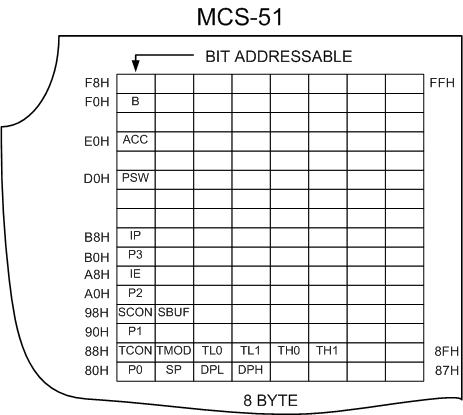
A Map of the on-chip memory area called the Special Function Register (SFR) space is shown in Figure 1.2.1. Note that in the SFRs not all of the addresses are occupied. Unoccupied addresses are not implemented on the chip. Read accesses to these addresses will in general return random data, and write accesses will have no effect. User software should not write 1s to these unimplemented locations, since they may be used in other 80C51 Family derivative products to invoke new features. The functions of the SFRs are described in the text that follows.


Microcontroller SFR

Figure 1.2.1. MCS-51 SFR Memory Map

Accumulator
ACC is the Accumulator register. The mnemonics for Accumulator-Specific instructions, however, refer to the Accumulator simply as A.

B Register
The B register is used during multiply and divide operations. For other instructions it can be treated as another scratch pad register.

Program Status Word
The PSW register contains program status information as detailed in Tabel 1.2.1

Stack Pointer
The Stack Pointer register is 8 bits wide. It is incremented before data is stored during PUSH and CALL executions. While the stack may reside anywhere in on-chip RAM, the Stack Pointer is initialized to 07H after a reset. This causes the stack to begin at locations 08H.

Data Pointer
The Data Pointer (DPTR) consists of a high byte (DPH) and a low byte (DPL). Its intended function is to hold a 16-bit address. It may be manipulated as a 16-bit register or as two independent 8-bit registers.

Ports 0 to 3
P0, P1, P2, and P3 are the SFR latches of Ports 0, 1, 2, and 3, respectively. Writing a one to a bit of a port SFR (P0, P1, P2, or P3) causes the corresponding port output pin to switch high. Writing a zero causes the port output pin to switch low. When used as an input, the external state of a port pin will be held in the port SFR (i.e., if the external state of a pin is low, the corresponding port SFR bit will contain a 0; if it is high, the bit will contain a 1).


Serial Data Buffer
The Serial Buffer is actually two separate registers, a transmit buffer and a receive buffer. When data is moved to SBUF, it goes to the transmit buffer and is held for serial transmission. (Moving a byte to SBUF is what initiates the transmission.) When data is moved from SBUF, it comes from the receive buffer.

Timer Registers
Register pairs (TH0, TL0), and (TH1, TL1) are the 16-bit Counting registers for Timer/Counters 0 and 1, respectively.

Control Register
Special Function Registers IP, IE, TMOD, TCON, SCON, and PCON contain control and status bits for the interrupt system, the Timer/Counters, and the serial port. They are described in later sections.

Table 1.2.1 Program Status Word

MSB

LSB
CY
AC
F0
RS1
RS0
OV
-
P

BIT
SYMBOL
FUNCTION
PSW.7
CY
Carry flag.
PSW.6
AC
Auxilliary Carry flag. (For BCD operations.)
PSW.5
F0
Flag 0. (Available to the user for general purposes.)
PSW.4
RS1
Register bank select control bit 1.
Set/cleared by software to determine working register bank. (See Note.)
PSW.3
RS0
Register bank select control bit 0.
Set/cleared by software todetermine working register bank. (See Note.)
PSW.2
OV
Overflow flag.
PSW.1
-
User-definable flag.
PSW.0
P
Parity flag.
Set/cleared by hardware each instruction cycle to indicate an odd/even number of “one” bits in the Accumulator, i.e., even parity.

Program Status Word
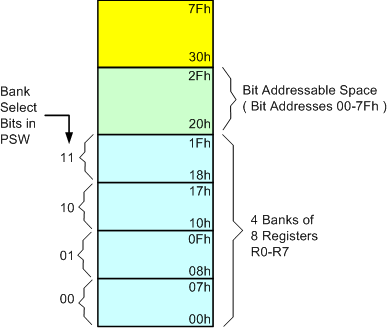
The Program Status Word (PSW) contains several status bits that reflect the current state of the CPU. The PSW, shown in Figure 10, resides in the SFR space. It contains the Carry bit, the Auxiliary Carry (for BCD operations), the two register bank select bits, the Overflow flag, a Parity bit, and two user-definable status flags. The Carry bit, other than serving the function of a Carry bit in arithmetic operations, also serves as the “Accumulator” for a number of Boolean operations. The bits RS0 and RS1 are used to select one of the four register banks shown in Figure 1.7. A number of instructions refer to these RAM locations as R0 through R7. The selection of which of the four is being referred to is made on the basis of the RS0 and RS1 at execution time.

The Parity bit reflects the number of 1s in the Accumulator: P = 1 if the Accumulator contains an odd number of 1s, and P = 0 if the Accumulator contains an even number of 1s. Thus the number of 1s in the Accumulator plus P is always even. Two bits in the PSW are uncommitted and may be used as general purpose status flags.


Read More...

Microcontroller MCS-51 Architecture

1.1. Memory Organization

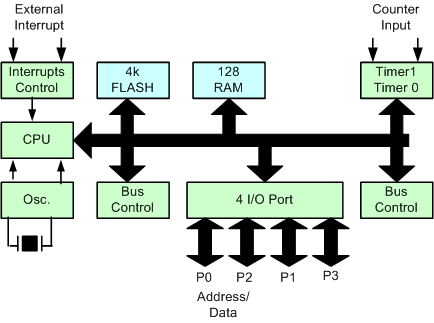
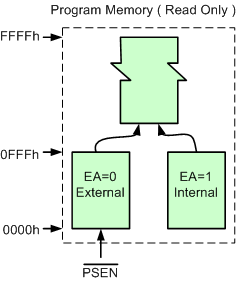
All 80C51 devices have separate address spaces for program and data memory, as shown in Figures 1.1.1 and 1.1.2. The logical separation of program and data memory allows the data memory to be accessed by 8-bit addresses, which can be quickly stored and manipulated by an 8-bit CPU. Nevertheless, 16-bit data memory addresses can also be generated through the DPTR register. Program memory (ROM, EPROM) can only be read, not written to. There can be up to 64k bytes of program memory. In the 89s51, the lowest 4k bytes of program are on-chip. In the ROMless versions, all program memory is external. The read strobe for external program memory is the PSEN (program store enable).


Microcontroller Blog Diagram

Figure 1.1.1 89s51 Block Diagram

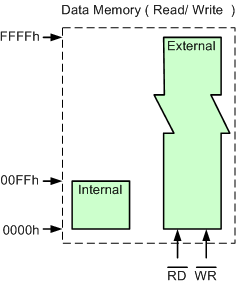
Data Memory (RAM) occupies a separate address space from Program Memory. In the 80C51, the lowest 128 bytes of data memory are on-chip. Up to 64k bytes of external RAM can be addressed in the external Data Memory space. In the ROMless version, the lowest 128 bytes are on-chip. The CPU generates read and write signals, RD and WR, as needed during external Data
Memory accesses. External Program Memory and external Data Memory may be combined if desired by applying the RD and PSEN signals to the inputs of an AND gate and using the output of the gate as the read strobe to the external Program/Data memory.

Program Memory
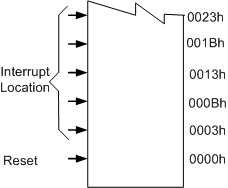
Figure 1.1.4 shows a map of the lower part of the Program Memory. After reset, the CPU begins execution from location 0000H. As shown in Figure 1.1.4, each interrupt is assigned a fixed location in Program Memory. The interrupt causes the CPU to jump to that location, where it commences execution of the service routine. External Interrupt 0, for example, is assigned to location 0003H. If External Interrupt 0 is going to be used, its service routine must begin at location 0003H. If the interrupt is not going to be used, its service location is available as general purpose Program Memory.


Microcontroller Memory Program Structure
Figure 1.1.2. Memory Program Structure

Microcontroller Interrupt Location

Figure 1.1.3. Interrupt Location

Data Memory
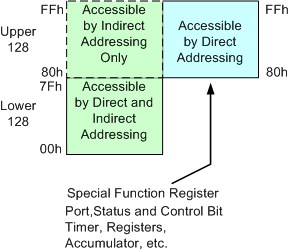
The right half of Figure 1.4 shows the internal and external Data Memory spaces available to the 80C51 user.The CPU generates RD and WR signals as needed during external RAM accesses. Internal Data Memory is mapped in Figure1.5. The memory space is shown divided into three blocks, which are generally referred to as the Lower 128, the Upper 128, and SFR space.

Microcontroller Memory Data Structure
Figure 1.1.4. Memory Data Structure

Internal Data Memory addresses are always one byte wide, which implies an address space of only 256 bytes. However, the addressing modes for internal RAM can in fact accommodate 384 bytes, using a simple trick. Direct addresses higher than 7FH access one memory space, and indirect addresses higher than 7FH access a different memory space. Thus Figure 1.1.5. shows the Upper 128 and SFR space occupying the same block of addresses, 80H through FFH, although they are physically separate entities.

Microcontroller Internal Data Memory

Figure 1.5. Internal Data Memory

The Lower 128 bytes of RAM are present in all 80C51 devices as mapped in Figure 1.1.6. The lowest 32 bytes are grouped into 4 banks of 8 registers. Program instructions call out these registers as R0 through R7. Two bits in the Program Status Word (PSW) select which register bank is in use. This allows more efficient use of code space, since register instructions are shorter than instructions that use direct addressing.

Microcontroller Internal RAM

Figure 1.1.6. Lower 128 bytes of internal RAM


All of the bytes in the Lower 128 can be accessed by either direct or indirect addressing. The Upper 128 (Figure 1.1.7) can only be accessed by indirect addressing.

Microcontroller Internal RAM

Figure 1.1.7.Upper 128 Bytes of Internal RA


Read More...

Seputar Mikrokontroler

1. Apa itu mikrokontroler ?
Mikrokontroler adalah suatu alat elektronika digital yang mempunyai masukan dan keluaran serta kendali dengan program yang bisa ditulis dan dihapus dengan cara khusus, cara kerja mikrokontroler sebenarnya membaca dan menulis data. Sekedar contoh, bayangkan diri Anda saat mulai belajar membaca dan menulis, ketika Anda sudah bisa melakukan hal itu Anda bisa membaca tulisan apapun baik buku, cerpen, artikel dan sebagainya, dan Andapun bisa bisa menulis hal-hal sebaliknya. Begitu pula jika Anda sudah mahir membaca dan menulis data maka Anda bisa membuat suatu sistem pengaturan otomatik sesuai keinginan Anda.
Mikrokontroler adalah sebuah komputer didalam chip yang digunakan untuk mengontrol peralatan elektronik. Mikrokontroler itu sejenis mikroprosesor yang menekankan efisiensi dan efektifitas biaya. Secara harfiahnya adalah "pengendali kecil" dimana sebuah sistem elektronik yang sebelumnya banyak memerlukan komponen-komponen pendukung seperti IC TTL dan CMOS dapat direduksi/diperkecil dan akhirnya terpusat serta dikendalikan oleh mikrokontroler ini. Dengan penggunaan mikrokontroler ini maka :

Sistem elektronik akan menjadi lebih ringkas

Rancang bangun sistem elektronik akan lebih cepat karena sebagian besar dari sistem adalah perangkat lunak yang mudah dimodifikasi

Pencarian gangguan lebih mudah ditelusuri karena sistemnya yang kompak
Namun demikian tidak sepenuhnya mikrokontroler bisa mereduksi komponen IC TTL dan CMOS yang seringkali masih diperlukan untuk aplikasi kecepatan tinggi atau sekedar menambah jumlah saluran masukan dan keluaran (I/O). Dengan kata lain, mikrokontroler adalah versi mini atau mikro dari sebuah komputer karena mikrokontroler sudah mengandung beberapa periferal yang langsung bisa dimanfaatkan, misalnya port paralel, port serial, komparator, konversi digital ke analog (DAC), konversi analog ke digital dan sebagainya hanya menggunakan sistem minimum yang tidak rumit atau kompleks.

2. Manfaat/prospek apa yang bisa saya peroleh jika menguasai mikrokontroler ?
Banyak sekali, dengan melihat penjelasan nomor 1, maka “batasnya hanya imajinasi Anda”.
Dengan menguasainya maka kita bisa menerapkannya kedalam kehidupan sehari-hari seperti mengendalikan suatu perangkat elektronik dengan berbagai sensor dan kondisi seperti cahaya, getaran, panas, dingin, lembab dan lain-lain. Sekedar contoh sederhana penggunaan mikrokontroler, lihatlah disekitar lingkungan Anda ada toaster, mesin, cuci, microwave kemudian tengoklah didunia pertanian Anda bisa membuat kontrol kelembaban untuk budidaya jamur, didunia perikanan Anda bisa mengendalikan suhu air kolam. Bahkan Anda bisa membuat PABX mini, SMS Gateway, atau kearah military Anda bisa membuat radio militer frekuensi hopping (radio komunikasi anti sadap dengan lompatan frekuensi 100 kali dalam 1 detik), sistem monitoring cuaca dengan balon udara, automatic vehicel locator (menggunakan GPS) dan sebagainya. Semua itu sekedar contoh, masih banyak lagi yang bisa Anda lakukan dengan mikrokontroler.
Sebagai prospek, arah perkembangan dunia elektronika saat ini adalah ke embedded system (sistem tertanam) atau embedded electronic (elektronik tertanam). salah satunya dengan menggunakan mikrokontroler, jadi jika Anda belajar dan menguasai mikrokontroler sudah tepat pada jalurnya.
3. Ada berapa macam/jenis mikrokontroler itu ?
Secara teknis hanya ada 2 yaitu RISC dan CISC dan masing-masing mempunyai keturunan/keluarga sendiri-sendiri.
RISC kependekan dari Reduced Instruction Set Computer : instruksi terbatas tapi memiliki fasilitas yang lebih banyak
CISC kependekan dari Complex Instruction Set Computer : instruksi bisa dikatakan lebih lengkap tapi dengan fasilitas secukupnya.


Read More...

Rumahku


Bagi yg mo silaturahmi, silahkan berkunjug ke rumah.

Jangan lupa bawa rokok ya. he he he he he


Read More...

Implementasi CSS

Ada 4 cara memasang kode CSS ke dalam kode HTML / halaman web, yaitu:

1. Inline CSS
2. Embed atau memasang kode css ke dalam bagian <head>
3. Nge link ke external CSS
4. Import CSS file

Yuk kita bahas satu per satu…

Inline CSS
Kode CSS dituliskan langsung ke dalam tag HTML yang ingin di format. Penulisan cara ini tidak memerlukan penulisan selector dalam kode CSS.

Cara ini sebaiknya hanya digunakan jika anda mau memformat suatu elemen satu kali saja.

Contoh:

<P style=”color:blue”>

Isi paragraf.

</p>

Pada contoh di atas, elemen paragraf <P> di format agar tulisannya menggunakan warna biru. Elemen paragraf lain, tidak akan menggunakan warna biru, karena format ini hanya berlaku pada elemen paragraf yang ditentukan kode CSS nya.

Penulisan CSS dengan cara ini di mulai dengan kata style: lalu di ikuti dengan syntax property: value.

Embedded CSS

Anda bisa juga menempelkan kode CSS di antara tag <head> dan </head>. Penulisan CSS dengan cara ini diawali dengan tag <style> dan diakhiri dengan tag </style>.

Contoh:
<head>
<style type="text/css" media=screen>
p {color:blue;}
</style>
</head>

Dalam contoh di atas semua elemen <P> dalam halaman web tersebut akan diformat menggunakan font berwarna biru.
External CSS
Kode CSS external di tulis dalam satu file terpisah yang disimpan dengan akhiran .css. Anda lalu perlu memanggil file CSS tersebut ke dalam semua halaman web yang anda buat. Dengan cara ini, anda hanya perlu memiliki satu set kode CSS yang digunakan untuk semua halaman web anda. Jadi ada dua langkah dalam pengimplementasian CSS dengan cara ini.

Contoh:

  1. Anda membuat satu file dengan notepad atau teks editor lain, dan berinama, misalkan: style.css, lalu tuliskan kode-kode css di dalam file tersebut.
    p {font-family: arial; font-size: small;}
    h1 {color: red; }

  2. Langkah kedua adalah memanggil file style.css dari semua halaman web. Caranya dengan memasukkan kode di bawah ini, di antara tag <head> dan </head>


    <head>

    <link rel=”stylesheet” href=”style.css” type=”text/css”>

    </head>


Import CSS

Anda bisa juga meng-import CSS ke dalam suatu halaman website menggunakan tag import.

Contoh:
@import "style.css";
atau
@import url("style.css");


Penggunaan Lebih dari Satu Kode CSS

Apabila ada lebih dari satu kode CSS untuk satu elemen, maka yang akan digunakan adalah kode yang lebih spesifik.

Misalkan dalam satu halaman web, menggunakan eksternal style sheet untuk memformat elemen H1 sbb:

h1 {
color: red;
text-align: left;
font-size: 8pt
}

Sementara di halaman web yang sama, di antara tag <head> ada kode CSS sbb:
h1 {
text-align: right;
font-size: 20pt
}

Perhatikan bagaimana pemformatan saling bertabrakan, dari eksternal style sheet, text-align=left sementara dari internal style sheet, text-align=right.

Dalam kasus seperti ini, maka yang akan aktif adalah kode yang lebih spesifik, dalam hal ini, internal style sheet lebih spesifik dibandingkan eksternal style sheet.

Jadi, dalam contoh di atas, kode yang akan diimplementasikan adalah sbb:
color: red;
text-align: right;
font-size: 20pt


Read More...

Layout Page

Saat itu saya sedang belajar untuk membuat web dinamis yang berbasis PHP. pada saat program sudah selesai, saya coba jalankan dan "Eng Ing Eng" program berjalan dengan semestinya.

Namun setelah program berjalan, terlihat layout tampilan yang sangat menjemukan. Waduh..... ya terpaksa bongkar program, coding ulang dan jalankan program lagi dengan harapan tidak ada yang kelewatan saat koding program.

Dari pengalaman ini, kadang pada saat kita membuat page berbasis dinamis akan jauh lebih sulit mengatur layout dari pada programnya sendiri.

Sementara setelah tanya sana-sini sama mbah Google, dapat jawaban juga.

Yup...... Ternyata obatnya adalah CSS.

Apa Itu CSS?

CSS adalah singkatan dari Cascading Style Sheets. Kalau baca di kamus, cascading itu artinya air terjun. Tapi dalam hal ini, yang di maksud adalah, aliran dari suatu kode ke kode lain yang saling berhubungan.

Jadi kalau di tulis lengkap dalam bahasa Indonesia kira-kira arti CSS adalah: kumpulan kode-kode yang berurutan dan saling berhubungan untuk mengatur format / tampilan suatu halaman HTML.

Keuntungan Penggunaan CSS

Jika anda memiliki beberapa halaman website dimana anda menggunakan font arial untuk tulisannya, lalu suatu hari anda bosan dengan arial dan ingin mengganti ke trebuchet, anda harus merubah satu per satu halaman website anda dan merubah tipe font dari arial menjadi trebuchet.

Dengan menggunakan css, dimana semua halaman web memakai css yang sama, anda cukup merubah satu baris kode css untuk merubah font di semua halaman web dari arial ke trebuchet.

Jadi, keuntungan menggunakan CSS, lebih praktis!

Kekurangan Penggunaan CSS

Tidak semua browser mengartikan kode CSS dengan cara yang sama. Jadi kadang-kadang, tampilan web dengan CSS terlihat baik di browser yang satu, tapi berantakan di browser yang lain. Jadi anda harus memeriksa tampilan supaya terlihat baik di semua browser dan menambahkan kode-kode khusus browser tertentu jika memang dibutuhkan agar tampilan web anda terlihat baik di semua browser.


Read More...